Core Features
Position Cards (Dashboard)
View comprehensive information about individual liquidity positions by clicking on any position card in your dashboard.
Position Cards (Dashboard)
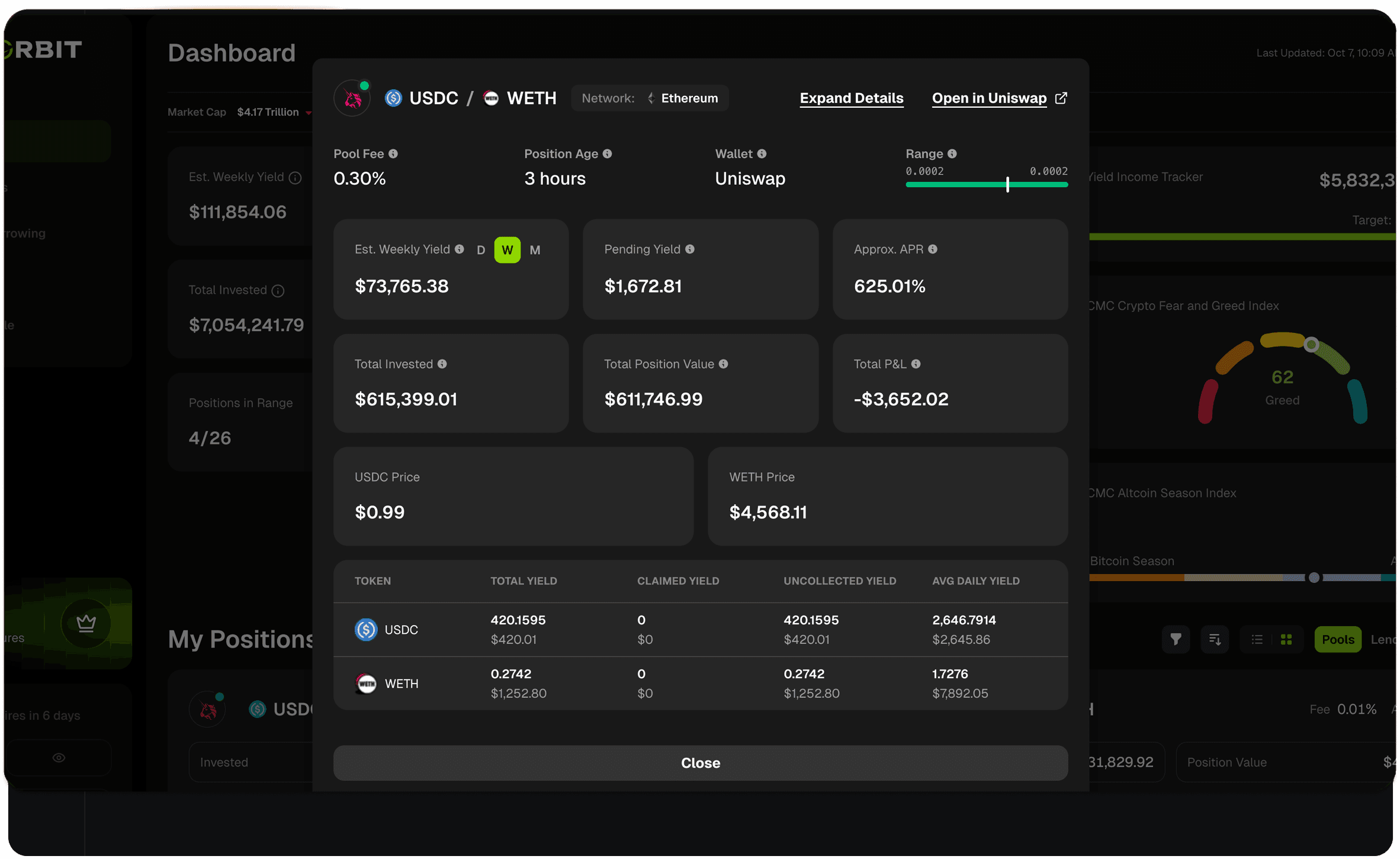
Accessing Position Details
From your Portfolio Dashboard:
Click on any position card in your "My Positions" section
A detailed modal opens showing complete position information
Click "Close" or outside the modal to return to your dashboard
Active Position Information
Position Header
Value | Description |
|---|---|
Protocol | The protocol where your position is. |
Range Status Indicator | Red dot = Out of range (not earning fees) Green dot = In range (actively earning fees) |
Token Pair | The two tokens in your liquidity position (e.g., USDC/WETH) with token icons. |
Network | The blockchain where this position exists (e.g., Ethereum, Optimism, Solana). |
Top Row Metrics
Metric | Definition |
|---|---|
Pool Fee | The fee tier for this pool (e.g., 0.30%) |
Position Age | How long you've held this position |
Wallet | Which connected wallet holds this position |
Range | Visual representation of your price range with current price indicator |
Yield & Performance Metrics
Metric | Description |
|---|---|
Est. Weekly Yield | Projected earnings for the week. Toggle between Daily (D), Weekly (W), or Monthly (M) views. |
Pending Yield | Uncollected fees available to claim right now. |
Approx. APR | Current annualized return rate for this position. |
Portfolio Value Metrics
Metric | Definition |
|---|---|
Total Invested | Your initial capital deployed into this position. |
Total Position Value | Current value of your position including tokens and uncollected fees. |
Total P&L | Your profit or loss on this position. |
Yield Breakdown Table
Column | Description |
|---|---|
Token | Which token the yield is in (USDC, WETH, etc.) |
Total Yield | All fees earned since position opened (token amount + USD value) |
Claimed Yield | Fees you've already collected (token amount + USD value) |
Uncollected Yield | Fees available to claim now (token amount + USD value) |
Avg Daily Yield | Average daily earnings for this token (token amount + USD value) |
Closed Position Information
For positions that are no longer active, you'll see:
Status Banner "THIS POSITION IS NO LONGER ACTIVE" displayed prominently at the top.
What's Different:
Metrics Shown
Metric | Description |
|---|---|
Total Invested | Your original capital deployed |
Total P&L | Final profit/loss when position was closed |
Total Withdrawn | Amount you withdrew when closing the position |
Quick Actions
Expand Details
Click "Expand Details" to see:
Additional position metrics
Historical performance data
Transaction history
More detailed analytics
Open in Uniswap (or Protocol)
Click "Open in [Protocol]" to:
View position on the native protocol interface
Claim pending fees
Add or remove liquidity
Close the position
Adjust price ranges
Note: This opens a new tab and takes you directly to your position on the protocol's website.
Join our Discord Server
Any other questions? Get in touch