Core Features
Portfolio Dashboard (Pools)
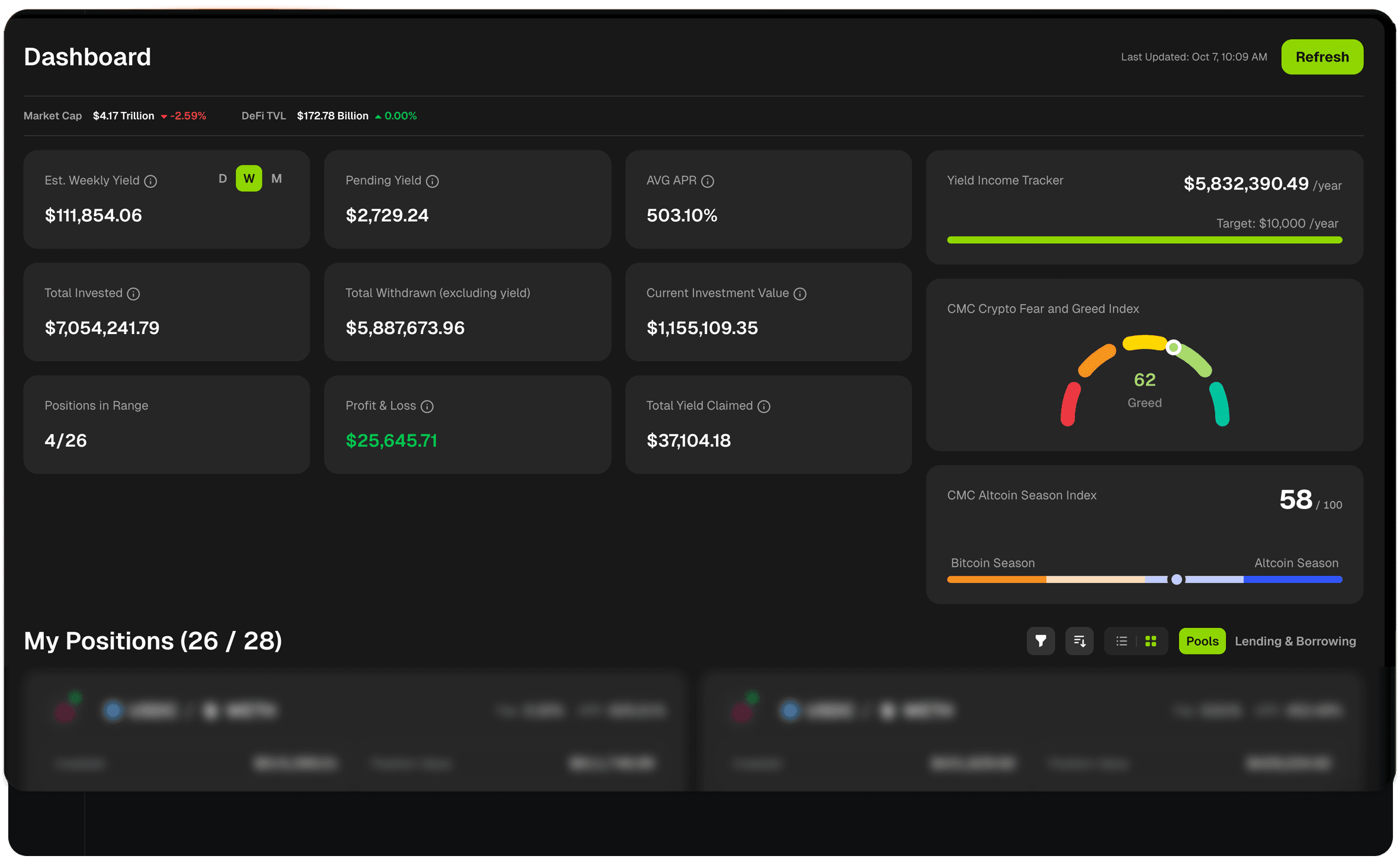
Your Portfolio Dashboard is the command center for monitoring all your DeFi positions. It provides a real-time overview of your liquidity pools, lending positions, and overall portfolio performance across all supported chains.
Note: This page covers the Pools view. For lending and borrowing positions, see Lending & Borrowing Dashboard.
Dashboard Overview
The dashboard automatically updates based on your activity, showing live data for critical metrics like prices, range status, and yields. Everything you need to make informed decisions is visible at a glance.
Market Context Bar
Indicator | Definition |
|---|---|
Market Cap | Total cryptocurrency market capitalization with 24-hour percentage change |
DeFi TVL | Total Value Locked across all DeFi protocols with 24-hour percentage change |
These metrics help you understand the broader market context for your investments.
Key Performance Metrics
The main dashboard displays your most important portfolio metrics in easy-to-read cards:
Metric | Definition | How it's calculated |
|---|---|---|
Est. Daily/Weekly/Monthly Yield | Your projected earnings for the week based on current performance. Toggle between Daily (D), Weekly (W), or Monthly (M) views to see different timeframes. | Projected yield earnings based on approximate APR from your active positions. |
Pending Yield | Total uncollected fees available to claim across all your positions. | Accumulated fees sitting in your positions that you haven't claimed yet. These fees are already yours—you just need to execute a transaction to collect them. |
AVG APR | Your current weighted average annual percentage rate across all active positions. | Your current annualized return rate based on fees generated. This only includes positions that are actively earning (in-range liquidity positions). |
Total Invested | The total amount of capital you've deployed into DeFi positions. | Your initial deposits across all liquidity pools, measured in USD. |
Total Withdrawn (excluding yield) | The total amount of principal you've withdrawn from positions, not counting fees or yields collected. | Tracks your capital flow and shows how much of your original investment is still actively deployed. |
Current Investment Value | The current USD value of all your liquidity positions combined. | Current token values + uncollected fees. This is the total value you could withdraw if you closed all positions right now. |
Positions in Range | Shows how many of your concentrated liquidity positions are currently in-range versus total positions. | Number of in-range positions / Total positions (e.g., "3/4" means 3 out of 4 positions are in-range and actively earning fees). |
Profit & Loss | Your total realized and unrealized gains/losses across all positions. | Position value changes + fees earned - impermanent loss - gas costs. Green indicates profit, red indicates loss. |
Total Yield Claimed | The total amount of fees you've collected from all positions over time. | Sum of all fee collection transactions you've executed. This is your actual realized income from providing liquidity and does not include uncollected pending yield. |
Yield Income Tracker
If you set an annual yield income target during signup, you'll see a progress tracker showing:
Indicator | Description |
|---|---|
Current Annual Run-Rate | Your projected annual income based on current daily yield: |
Your Target | The annual income goal you set (e.g., "$10,000 /year") |
Progress Bar | Visual indicator showing how close you are to reaching your goal. |
Important: Only in-range positions that are actively earning fees count toward your annual run-rate. Out-of-range positions are excluded from this calculation since they're not generating yield.
You can update your yield income target anytime from your account settings.
Market Sentiment Indicators
On the right side of your dashboard, you'll find market sentiment tools:
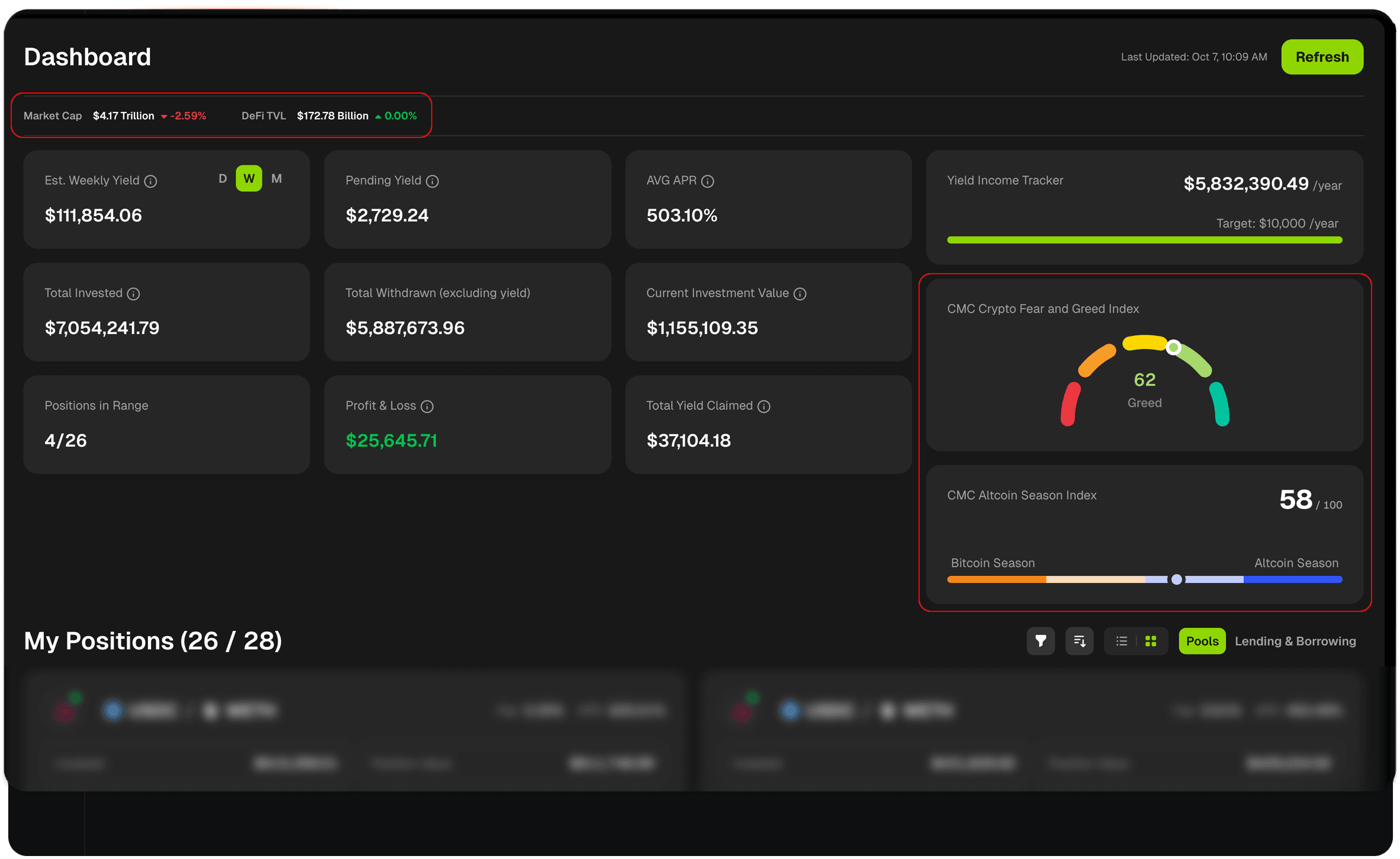
CMC Crypto Fear and Greed Index
A visual gauge showing current market sentiment from "Extreme Fear" to "Extreme Greed."
How to read it:
Red zone (0-25): Extreme Fear - Market may be oversold
Orange zone (25-45): Fear - Cautious market sentiment
Yellow zone (45-55): Neutral - Balanced market
Light Green (55-75): Greed - Bullish sentiment
Green (75-100): Extreme Greed - Market may be overbought
Why this matters: Understanding market sentiment helps you contextualize position performance and make better decisions about opening or closing positions.
CMC Altcoin Season Index
A numerical indicator (0-100) showing whether Bitcoin or Altcoins are performing better.
How to read it:
Below 50: Bitcoin Season - BTC outperforming altcoins
Above 50: Altcoin Season - Altcoins outperforming BTC
Why this matters: Helps you understand which assets are likely gaining momentum, useful for rebalancing strategies or identifying opportunities.
Understanding Your Dashboard Data
What Counts Toward Your Metrics?
Included in AVG APR: | NOT included in AVG APR: |
|---|---|
✅ In-range liquidity positions | ❌ Out-of-range positions |
✅ Active lending positions | ❌ Closed positions |
✅ Any position generating yield | ❌ Paused or inactive positions |
Included in Total Invested: | Included in Pending Yield: |
|---|---|
✅ All capital deployed to liquidity pools | ✅ All uncollected fees from liquidity pools |
✅ Both active and out-of-range positions | ❌ Does NOT include fees you've already claimed |
❌ Does NOT include lending positions | ❌ Does NOT include lending interest |
My Positions Section
Below the metrics cards, you'll see your complete list of positions with detailed information for each.
Position Filters & Views
ADD SCREENSHOT
Use filters to quickly find specific positions or focus on what matters most. When filters are active, both the position count and dashboard metrics update to reflect only the filtered positions.
Active Filter Indicator When any filter is enabled, you'll see an indicator and the position count will update. For example: "My Positions (4/23)" means 4 out of 23 total positions match your current filters.
Important: Filters also update your Key Performance Metrics cards at the top of the dashboard, showing data only for the filtered positions.
Filter Options:
Filter | Options | Description |
|---|---|---|
Range | All / Active / Inactive | Show positions that are in-range (Active), out-of-range (Inactive), or all positions. |
Status | All / Active / Inactive | Filter by whether positions are currently open (Active) or closed (Inactive). |
Chains | All Chains / Ethereum / Optimism / BSC / Solana / Unichain / Polygon / Zksync / Base / Arbitrum / Blast | View positions from specific blockchains only. |
Wallets | All Wallets / [Your wallet labels] | Filter to show positions from specific connected wallets. Useful when managing multiple addresses. |
Sort Options
Organize your positions by different criteria:
Sort By | Options | Description |
|---|---|---|
APR | High to Low / Low to High | Sort by annual percentage rate to see your best or worst performing positions. |
Value | High to Low / Low to High | Sort by position value to see your largest or smallest positions first. |
Range | Wider First / Narrower First | Sort by price range width. Wider ranges = more stable, narrower ranges = more concentrated. |
Yield | High to Low / Low to High | Sort by pending yield to see which positions have the most uncollected fees. |
Age | High to Low / Low to High | Sort by position age to see recently opened or long-standing positions. |
View Modes

Switch between two display formats:
View Mode | Description |
|---|---|
List View | Compact table format, ideal for scanning many positions quickly |
Cards View | Visual cards with more detail, better for reviewing individual position metrics |
Join our Discord Server
Any other questions? Get in touch