

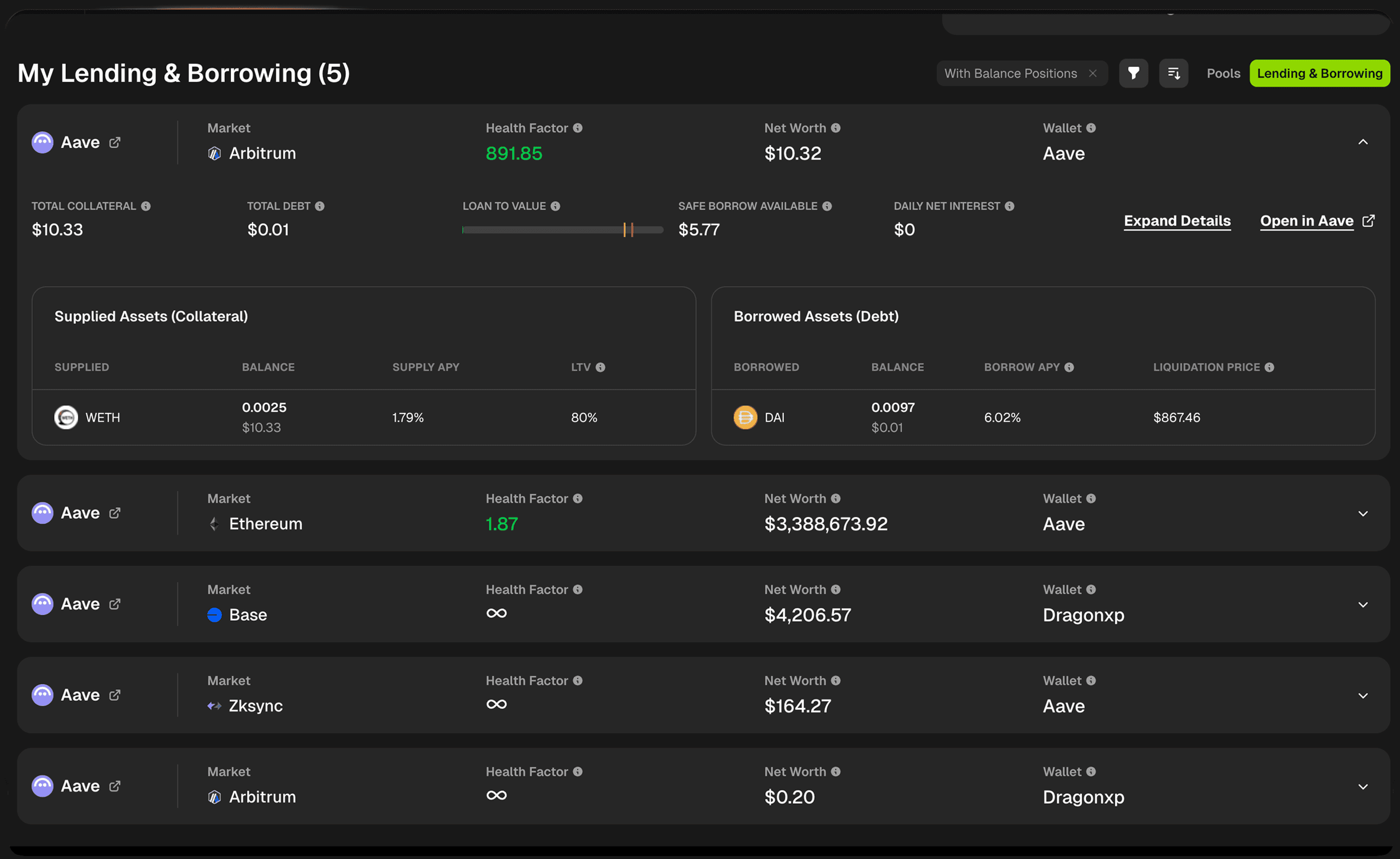
 DeFi Orbit tracks lending and borrowing positions on Aave V3 (Ethereum, Base, Arbitrum, Optimism, Polygon, BNB Chain, Avalanche), Morpho (Ethereum, Base), and Kamino (Solana).
From your Portfolio Dashboard:
DeFi Orbit tracks lending and borrowing positions on Aave V3 (Ethereum, Base, Arbitrum, Optimism, Polygon, BNB Chain, Avalanche), Morpho (Ethereum, Base), and Kamino (Solana).
From your Portfolio Dashboard:
- Click the Lending & Borrowing tab above your positions
- Your view switches from liquidity pools to lending positions
- You can also open the dedicated Lending & Borrowing page from the sidebar
Position Card Overview
Each lending/borrowing position card displays key information about your position on a specific protocol and blockchain.Position Header
Protocol & Market- Protocol logo (e.g., Aave)
- Protocol name with external link icon
- Market/blockchain indicator (e.g., Ethereum)
- Expand Details - Opens detailed position view
- Open in [Protocol] - Direct link to manage the position on the protocol
Key Metrics At a Glance
Top Row Summary Metrics
Understanding Current LTV
The LTV Indicator Visual bar showing your current loan-to-value ratio with three zones: Green Zone (Safe)- Your debt is well below maximum limits
- Low liquidation risk
- Room to borrow more if needed
- Shows your current LTV position
- The closer to red, the riskier your position
- Approaching liquidation threshold
- High risk of liquidation if prices move against you
- The highest LTV ratio your debt can reach as a percentage of your total collateral
- This is NOT your liquidation point
- Warning threshold before liquidation
- The debt-to-collateral ratio at which your position CAN be liquidated
- If your LTV reaches this level, liquidators can close your position
- Always maintain LTV well below this threshold
Supplied Assets (Collateral) Table
View all assets you’ve supplied to the lending protocol:
Why Supply APY Varies: Different assets have different supply rates based on:
- Protocol utilization
- Asset risk profile
- Market demand for borrowing that asset
- Higher LTV (e.g., 80%) = Can borrow more against this asset (usually stablecoins or blue chips)
- Lower LTV (e.g., 65%) = Can borrow less (riskier or more volatile assets)
Borrowed Assets (Debt) Table
View all assets you’ve borrowed from the protocol:
Why Borrow APY Varies: Borrow rates change based on:
- Protocol utilization (more borrowing = higher rates)
- Asset volatility
- Market demand
- If the borrowed asset’s price reaches this level, you’re at risk of liquidation
- Monitor this closely for volatile assets
- Multiple borrowed assets = multiple liquidation prices to track
Health Factor Alerts
You don’t have to watch your health factor manually. From Notification Settings, you can enable alerts per wallet:- Custom threshold - Get alerted when a wallet’s health factor drops below (or rises above) a level you choose (default 1.5)
- Delivery channels - Telegram, Email, or Discord webhook, plus the in-app notification bell
- Snooze - Temporarily pause alerts while you’re actively managing a position